---
title: How to customize your account on Ling app
description: How to personalize Ling make for a captivating learning experience.
---
[Skip to content](https://help.ling-app.com/en-us/faqs/how-to-customize-your-account-on-ling-app#main-content)
English - United States
Show submenu for translations
[](https://ling-app.com)
Open main navigation
Close main navigation
- English - United States
Show submenu for translations
- [Contact us](mailto:support@ling-app.com)
[Contact us](mailto:support@ling-app.com)
How can we help you?
- There are no suggestions because the search field is empty.
1. [Ling FAQs](https://help.ling-app.com/en-us/faqs?hsLang=en-us)
2. [Account Management](https://help.ling-app.com/en-us/faqs/account-management?hsLang=en-us)
September 14, 2025
# How to customize your account on Ling app
## Ling app lets you customize your account to suit your preferences and needs. This can make your language learning more fun and effective. Here are some of the things you can do to personalize your account:
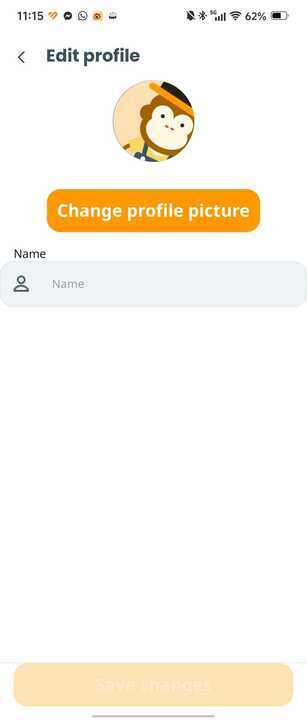
#### Edit Name & Profile Picture
You can change your name and profile picture on your Profile screen. This will show other Lingsters who you are on the Leaderboard. Just tap on the “Edit profile" button and choose a picture and a name you like.
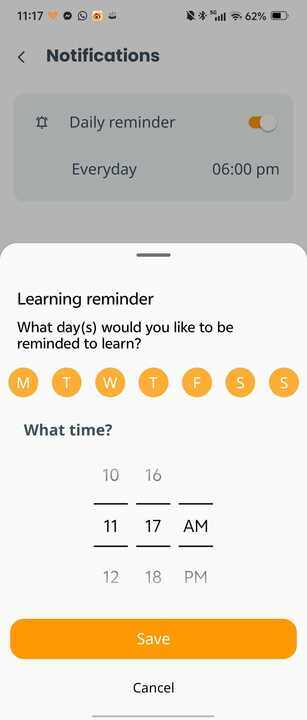
### Set Daily Reminder
You can set a daily reminder to help you achieve your language learning goals. You can choose the time and frequency of the reminder that works best for you. This will keep you motivated and consistent with your practice. To set a daily reminder, go to Settings from Profile screen and find the “Notifications” section.
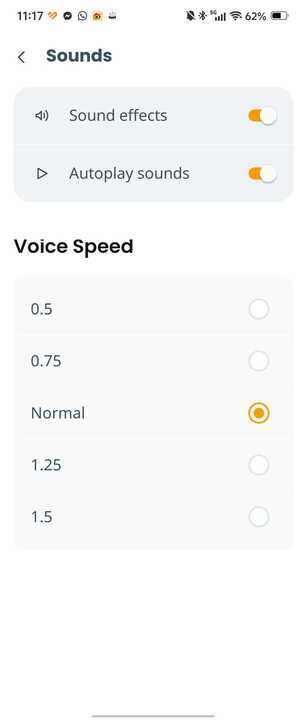
#### Sound settings
You can adjust the sound settings to make the learning more enjoyable and effective for you. You can change the sound effects, the sound speed, and the autoplay sound mode to your liking. These settings are in the Settings screen, under the “Sounds” section.
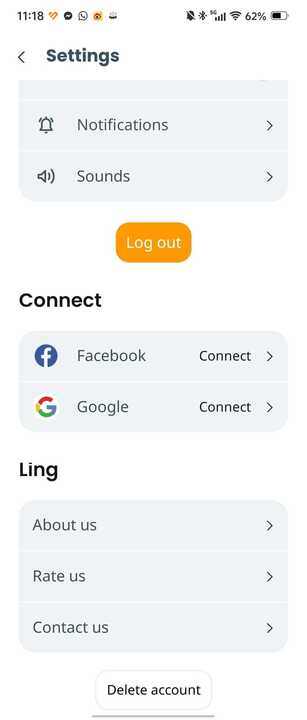
#### Link to Social Media (Facebook and Google)
You can link your Ling app account to your Facebook or Google account. This will make it easier to access your account and share your progress and achievements with others. To link your social media accounts, go to Settings screen and look for the “Connect” section.
We hope you enjoy customizing your account with Ling app. This will help you get the most out of the app and personalize your learning experience. You can make the app feel like it was made for you. So, take a few minutes to explore your account settings and make the app work for you.
\---
If you have any questions or face any issues with the app, you can contact [support@ling-app.com](mailto:support@ling-app.com). We'll get back to you within 24 hours!
Moreover, we'd love to hear what you think of our Ling app! Schedule a call with us [here](https://calendly.com/adam-ling-app/ling-user-interview?month=2023-01) to share your feedback and get 3 months using Ling Premium for yourself or a friend/family member for FREE.
At Ling, we want to unite the world by connecting people from different cultures.
\---
|  | [Ling Learn Languages](https://ling-app.com/) |
| --- | --- |
|  | [Language Blog - Ling App](https://ling-app.com/blog/) |
|  | [Learn Languages with Ling](https://www.instagram.com/ling_app/) |
|  | [Ling App](https://www.facebook.com/lingappltd) |
|  | [Ling Learn Languages](https://www.youtube.com/channel/UCjM2-M1SS2X0_ESkL3efhKw) |
|  | [Ling App](https://www.reddit.com/r/lingapp/) |
|  | [Ling Learn Languages](https://twitter.com/ling_languages) |
|  | [Ling App - Learn Languages](https://www.tiktok.com/@ling_app?lang=en) |
- [Ling](https://help.ling-app.com/en-us/faqs/ling?hsLang=en-us#main-content)
- [Ling FAQs](https://help.ling-app.com/en-us/faqs/ling?hsLang=en-us#ling-faqs)
- [Simya Solutions](https://help.ling-app.com/en-us/faqs/simya-solutions?hsLang=en-us#main-content)
- [Simya Solutions Troubleshooting](https://help.ling-app.com/en-us/faqs/simya-solutions?hsLang=en-us#simya-solutions-troubleshooting)
- [Simya Solutions FAQs](https://help.ling-app.com/en-us/faqs/simya-solutions?hsLang=en-us#simya-solutions-faqs)
- [Simya Solutions Getting Started](https://help.ling-app.com/en-us/faqs/simya-solutions?hsLang=en-us#simya-solutions-getting-started)
- [Simya Solutions Settings](https://help.ling-app.com/en-us/faqs/simya-solutions?hsLang=en-us#simya-solutions-settings)
- [Learn with Ling](https://help.ling-app.com/en-us/faqs/learn-with-ling?hsLang=en-us)
- [Using Ling](https://help.ling-app.com/en-us/faqs/using-ling?hsLang=en-us)
- [Account Management](https://help.ling-app.com/en-us/faqs/account-management?hsLang=en-us)
- [Subscription and Payments](https://help.ling-app.com/en-us/faqs/subscription-and-payments?hsLang=en-us#main-content)
- [Ling Membership](https://help.ling-app.com/en-us/faqs/subscription-and-payments?hsLang=en-us#ling-membership)
- [Settings](https://help.ling-app.com/en-us/faqs/settings?hsLang=en-us)
[](http://ling-app.com)
[mailto:support@ling-app.com](mailto:support@ling-app.com)
Copyright © 2025, Ling App