---
title: How can I cancel my subscription?
description: Ling is a language learning platform that allows users to learn nearly 70 languages on the phone, tablet, or desktop browser on an unlimited basis. Subscriptions are available to meet various budgets and learning needs, and the subscriptions are maintained on the platform that the user signed up on.
---
[Skip to content](https://help.ling-app.com/en-us/faqs/how-can-i-cancel-my-subscription#main-content)
English - United States
Show submenu for translations
[](https://ling-app.com)
Open main navigation
Close main navigation
- English - United States
Show submenu for translations
- [Contact us](mailto:support@ling-app.com)
[Contact us](mailto:support@ling-app.com)
How can we help you?
- There are no suggestions because the search field is empty.
1. [Ling FAQs](https://help.ling-app.com/en-us/faqs?hsLang=en-us)
2. [Subscription and Payments](https://help.ling-app.com/en-us/faqs/subscription-and-payments?hsLang=en-us)
3. [Ling Membership](https://help.ling-app.com/en-us/faqs/subscription-and-payments?hsLang=en-us#ling-membership)
September 14, 2025
# How can I cancel my subscription?
If you want to cancel your subscription, follow these steps!
**Steps to cancel on an Android device:**
1. On your Android phone or tablet, open Google Play Store
2. Check if you're signed into the correct Google Account
3. Tap "Menu Subscriptions"
4. Select the subscription you want to cancel
5. Tap "Cancel Subscription"
6. Follow the instructions
When you cancel a subscription, you're still able to use your subscription for the period you paid for.
For example, if you buy a one-month subscription on January 1st for $8.99 and decide to cancel it on January 3rd, you still have access to the subscription until January 31st.
After the subscription ends on January 31st, you won't be charged for the next month's subscription.
For more details, please check [here.](https://support.google.com/googleplay/answer/7018481)
**Steps to cancel on an iOS device:**
1 Open the Settings app
2. Tap your name
3. Tap Subscriptions (If you don't see "Subscriptions," tap "iTunes & App Store" instead. Then tap your Apple ID, View Apple ID, sign in, scroll down to Subscriptions, and tap Subscriptions)
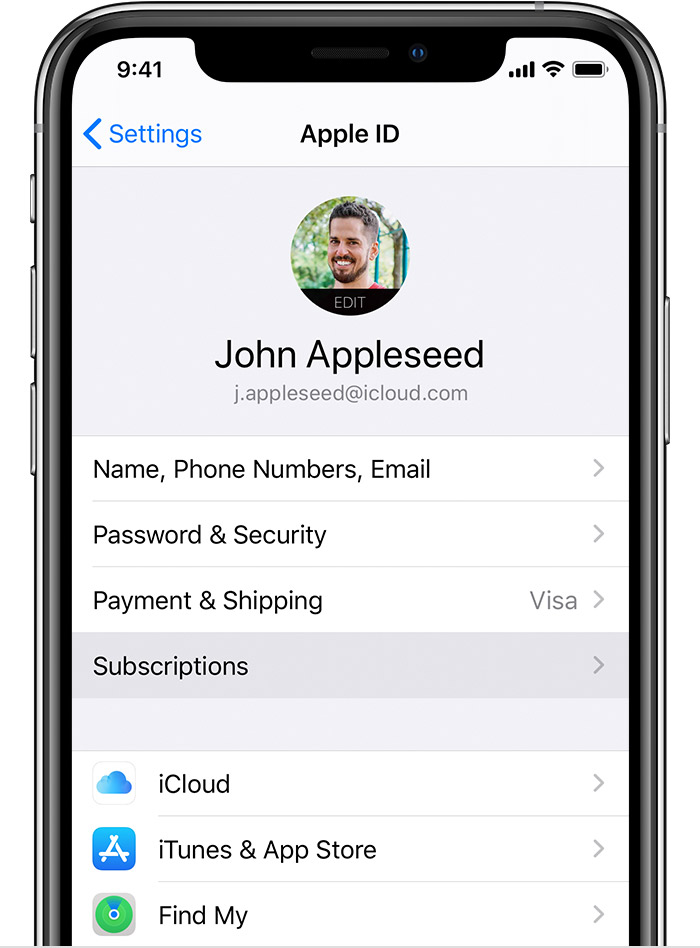
4. Tap the subscription that you want to manage
5. Tap "Cancel Subscription" (If you don't see "Cancel Subscription," the subscription is already canceled and won't renew automatically)
For more details, please check [here.](https://support.apple.com/en-us/HT202039)
**Steps to cancel on Ling Web:**
(If you subscribe to Ling on [Ling Web](https://ling-app.com/), you must cancel your subscription on the website only)
1. Log in to Ling Web
2. Go to Profile \> Settings
3. Cancel your subscription
Watch the instructional video [here](https://drive.google.com/file/d/1WJeLJ6VIl3Q3ZK99IEHN4B4WkRqv2NGA/view?usp=sharing).
**Please note:**
1. All Ling subscriptions are auto-renewal.
2. If you sign up for a free trial subscription and don't want to renew it, please cancel it at least 24 hours before the trial ends.
3. Uninstalling or deleting the app will not automatically stop your subscription. You must actively cancel the subscription using the steps above. You will still be charged if you uninstall the app but don't cancel your subscription.
4. You can always unsubscribe or change your subscription plan anytime before the current subscription period expires.
If you have any questions or face any issues with the app, you can contact [support@ling-app.com](mailto:support@ling-app.com). We'll get back to you within 24 hours!
At Ling, we want to unite the world by connecting people from different cultures.
- [Ling](https://help.ling-app.com/en-us/faqs/ling?hsLang=en-us#main-content)
- [Ling FAQs](https://help.ling-app.com/en-us/faqs/ling?hsLang=en-us#ling-faqs)
- [Simya Solutions](https://help.ling-app.com/en-us/faqs/simya-solutions?hsLang=en-us#main-content)
- [Simya Solutions Troubleshooting](https://help.ling-app.com/en-us/faqs/simya-solutions?hsLang=en-us#simya-solutions-troubleshooting)
- [Simya Solutions FAQs](https://help.ling-app.com/en-us/faqs/simya-solutions?hsLang=en-us#simya-solutions-faqs)
- [Simya Solutions Getting Started](https://help.ling-app.com/en-us/faqs/simya-solutions?hsLang=en-us#simya-solutions-getting-started)
- [Simya Solutions Settings](https://help.ling-app.com/en-us/faqs/simya-solutions?hsLang=en-us#simya-solutions-settings)
- [Learn with Ling](https://help.ling-app.com/en-us/faqs/learn-with-ling?hsLang=en-us)
- [Using Ling](https://help.ling-app.com/en-us/faqs/using-ling?hsLang=en-us)
- [Account Management](https://help.ling-app.com/en-us/faqs/account-management?hsLang=en-us)
- [Subscription and Payments](https://help.ling-app.com/en-us/faqs/subscription-and-payments?hsLang=en-us#main-content)
- [Ling Membership](https://help.ling-app.com/en-us/faqs/subscription-and-payments?hsLang=en-us#ling-membership)
- [Settings](https://help.ling-app.com/en-us/faqs/settings?hsLang=en-us)
[](http://ling-app.com)
[mailto:support@ling-app.com](mailto:support@ling-app.com)
Copyright © 2025, Ling App